Usage Analytics & Privacy Controls
You can control whether your account contributes usage analytics to help improve the product. This setting lives in your account Settings and applies across every browser and device where you are signed in; no per-device configuration is needed.
Finding the Privacy settings card
- Sign in to your account.
- Navigate to Settings from the main navigation.
- Scroll to the Privacy card.
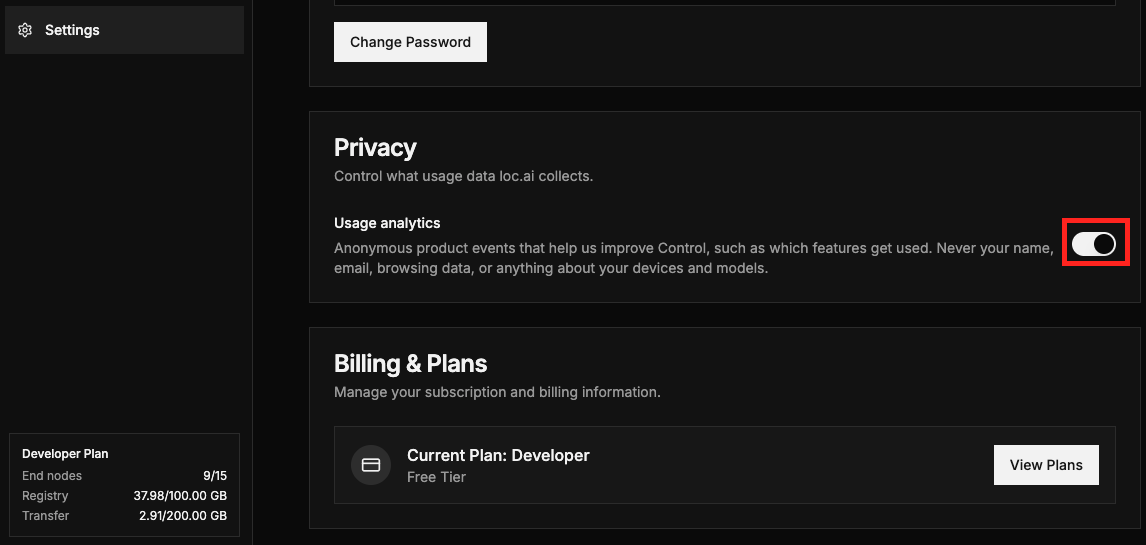
The card contains a single Usage analytics toggle along with helper text explaining what is collected: "Anonymous product events that help us improve Control, such as which features get used. Never your name, email, browsing data, or anything about your devices and models."
What the toggle controls
| State | Effect |
|---|---|
| On (default) | Anonymised usage events are sent to help the team understand how features are used and prioritise improvements. |
| Off | No usage events are sent. The change takes effect immediately. |
The setting is stored on your account, so turning analytics off on one device turns it off everywhere.
What is and is not collected
What is collected (when analytics is on)
- Anonymised interaction events (for example which features you use and in what order).
- Basic session context such as browser type.
What is never collected, regardless of the toggle
- Your name, email address, or username.
- Your IP address.
- Page URLs, referrer URLs, or navigation paths.
- Device identifiers, device names, or model information.
- Session recordings or screen replays; these are permanently disabled.
- Billing identifiers.
- Error messages from failed operations.
Your account is represented in analytics only by a random identifier that cannot be linked back to your email address or username.
Changing your analytics preference
- Go to Settings → Privacy.
- Click the Usage analytics toggle to turn it on or off.
- The change is saved automatically; no confirmation step is needed.
You can change this preference at any time. Turning analytics back on resumes event collection going forward; no historical data is back-filled.
Frequently asked questions
Does this setting sync across devices? Yes. Your preference is saved to your account and takes effect on every device where you are signed in.
Is session recording ever enabled? No. Screen and session recording is permanently disabled for all accounts and cannot be turned on by changing any setting.
Can analytics data be traced back to me? No. Your account is identified in analytics only by a randomly generated ID that is not derived from your email, username, or any other personal detail.
What is the default setting for new accounts? Usage analytics is on by default for all new and existing accounts. You can turn it off at any time from Settings.
Will turning off analytics affect my experience? No. All product features work identically regardless of your analytics preference.