Uninstalling
From the app (macOS and Linux)
- Open Preferences from the Locai Link menu-bar (tray) menu.
- In the Advanced panel, click Uninstall Locai Link….
- A confirmation dialog explains what will be removed. Confirm.
- On macOS, the system prompts for your admin password. Cancelling this prompt is a clean no-op — nothing is removed and the device stays registered.
- Uninstall completes in a few seconds.
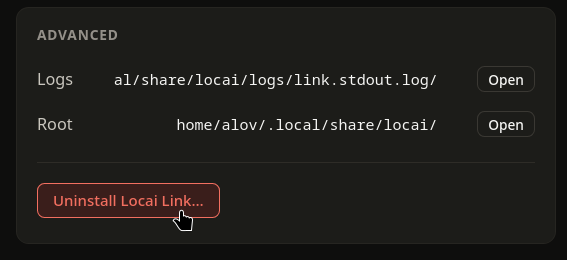
If you closed the setup window before ever finishing onboarding, the menu-bar icon also offers Uninstall Locai Link… directly, so an unfinished install is never stranded.
From the terminal (equivalent)
On any install — desktop or headless, every platform:
locai uninstall
The macOS desktop install also keeps the classic script path: sudo /Library/Locai/uninstall.sh. On Linux: ~/.local/share/locai/uninstall.sh.
What gets removed
Either path:
- Stops and removes the background service.
- Kills any running Locai Link processes.
- Removes the install root (
/Library/Locai/on macOS,~/.local/share/locai/on Linux), the app (/Applications/Locai Link.appon macOS, the.desktopentry and icons on Linux), and thelocaiCLI from your PATH. - Wipes per-user app data: caches, WebKit storage, cookies, preferences, saved window state.
- On macOS: removes pinned Dock tiles, unregisters the app from LaunchServices, and forgets the
.pkgreceipt so future reinstalls don't inherit stale ownership records. Upgrading from an older two-app install? The uninstaller also removes any leftover Setup Assistant.
The device is deregistered from Locai Control automatically
Uninstalling also deregisters this device from Control: the device entry and its model records are removed from your dashboard, and its subscription slot is freed. If the device has no connection to Control at uninstall time, the entry may persist temporarily; you can remove it manually from the Devices page. See Deregistering a Device for details.